
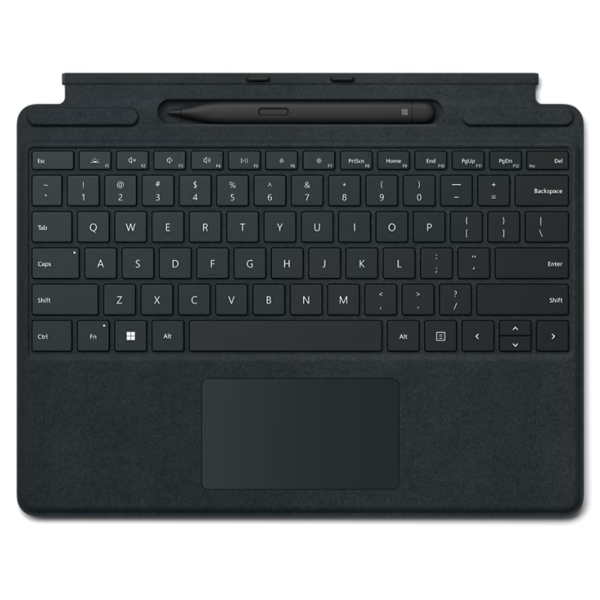
Description
Tech Specs
|
Compatibility |
Surface Pro Signature Keyboard compatibility*
Surface Slim Pen for Business designed for
|
|
Dimensions |
Surface Pro Signature Keyboard dimensions 11.38” x 8.90” x 0.19” (289.1 mm x 226.1 mm x 4.89 mm)Surface Slim Pen dimensions 5.38 x 0.44 x 0.25 in (136.8 x 11.3 x 6.3 mm) |
|
Weight |
Surface Pro Signature Keyboard with Surface Slim Pen weight 0.65 lb (294 g)Surface Pro Signature Keyboard 0.62 lb (281 g) Surface Slim Pen |
|
Exterior |
Surface Pro Signature Keyboard exterior Material: Alcantara® Colors: Sapphire, Forest, Platinum, Poppy Red, BlackSurface Slim Pen color and material Matte Black; plastic enclosure |
|
Connections |
Surface Slim Pen connections Bluetooth® Wireless 5.0 Technology |
|
Interface |
Surface Pro Signature Keyboard interface Magnetic |
|
Pen integration |
Surface Pro Signature Keyboard Pen integration Surface Slim Pen storage and charging |
|
Keys |
Surface Pro Signature Keyboard keys Activation: Moving (mechanical) keys Layout: QWERTY (US), full row of function keys (F1 – F12) Dedicated buttons for Windows shortcuts, media controls,screen brightness Right click button |
|
Sensors |
Surface Pro Signature Keyboard sensors Accelerometer |
|
Buttons |
Surface Slim Pen buttons Side button, Top Button with eraser functionality |
|
Tactile signals |
Surface Slim Pen Haptic feedback functionality compatible only with Surface Pro 8*, Surface Pro 9*, and Surface Laptop Studio* with Windows 11 |
|
Pressure and sensitivity |
Surface Slim Pen pressure sensitivity 4,096 pressure levels Zero force inking |
|
Battery |
Surface Slim Pen battery Rechargeable Lithium Ion Up to 15 hours of typical usage |
|
Battery capacities |
Surface Slim Pen battery capacities Battery Capacity Nominal (WH) 0.171 Battery Capacity Min (WH) 0.164 |
|
What’s in the box |
|
|
Warranty |
1 year limited hardware warranty |

Reviews
There are no reviews yet.